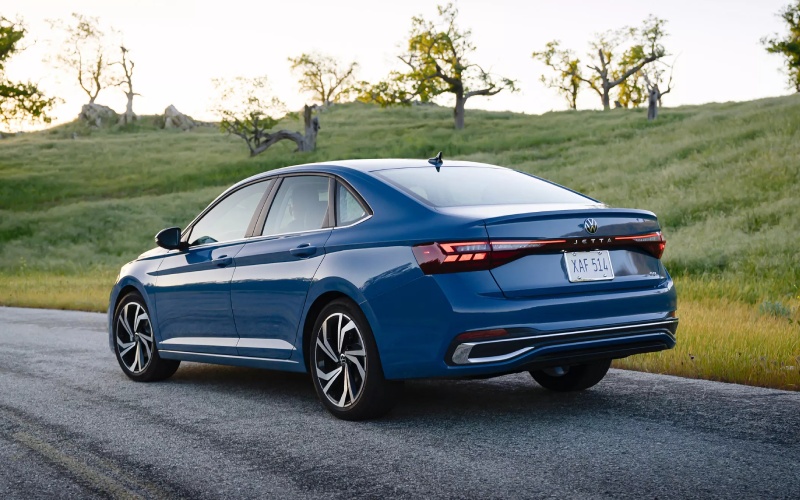
Cardinale Volkswagen Salinas - How Do I Set Up myVW+ Remote Start on a 2026 Volkswagen Jetta in Salinas, CA?
The 2026 Volkswagen Jetta makes everyday driving feel easy, and if your Jetta is equipped with Remote Start, myVW+ lets you start the engine and precondition the cabin from your phone. For Salinas drivers juggling Highway 101 commutes, school drop-offs near North Main Street, or apartment parking on the north side of town, being able to warm up or cool down the Jetta before you get in is a real, everyday advantage. Below, our Cardinale Volkswagen Salinas team walks you through what Remote Start is, which Jetta models support it, how to activate and use it with myVW+, and how to troubleshoot common snags—all with local tips for life in and around Salinas.
What Remote Start does on the 2026 Jetta
Remote Start allows you to start your Jetta’s engine from a distance using the myVW mobile app, so the climate system can begin conditioning the cabin before you step inside. It’s especially helpful when your car is parked curbside or in a shared lot, and you want the interior ready to go the moment you buckle up. For the 2026 Jetta, Remote Start is available on select trims (for example, Jetta SE lists Remote engine start among its highlight features). Always confirm equipment on the specific vehicle you’re considering—our team can verify build details for any Jetta in our inventory.
Because Remote Start is a connected service, it works through myVW+ and requires cellular coverage and a valid myVW account. The service is part of Volkswagen connected features that also include Remote Lock/Unlock and Last Parked Location, depending on vehicle equipment and subscription status.
What you need before you begin
Before setting up Remote Start in Salinas, make sure you have the basics in place. This prep keeps activation smooth and fast—whether you’re parked at home in Creekbridge or outside the office near West Laurel Drive.
- A compatible Jetta (2026 model year) with Remote Start hardware: Remote Start is available on select trims and packages—ask our team to confirm your VIN’s equipment.
- A myVW account and the myVW mobile app: Download the app to your smartphone and create or sign in to your account.
- Vehicle identification number (VIN): You’ll link the app to your Jetta using the VIN, visible on the dashboard near the windshield or inside the driver’s door jamb.
- Cellular coverage and GPS signal: myVW+ services rely on network and GPS availability; coverage can vary by location and provider.
- Acceptance of myVW+ Terms of Service: You’ll be prompted to accept terms when enabling connected features.
Step-by-step: Activate myVW+ and enable Remote Start
Set up takes just a few minutes. If you prefer, our Product Specialists can help you complete all of this at Cardinale Volkswagen Salinas during your test drive or delivery.
- Download and open the myVW app on your smartphone.
- Create or sign in to your myVW account using your email.
- Add your Jetta by entering or scanning the VIN.
- Follow the on-screen prompts to verify ownership—this may include confirming a code in the vehicle’s infotainment system.
- From the myVW app home screen, locate Remote Access features and accept the myVW+ Terms of Service.
- Confirm that Remote Start appears as an available control (if your Jetta is equipped).
- Optional: In your vehicle’s climate settings, choose your preferred A/C or heat behavior for remote starts so the cabin conditions are the way you like.
- Test Remote Start from the app—watch for a confirmation and allow the vehicle a few moments to initialize.
Note: Not all connected services are available on all operating systems or devices. Features and menus can vary slightly by software version; consult your Owner’s Manual for details.
Everyday ways Salinas drivers use Remote Start
Once it’s enabled, Remote Start becomes a small convenience that adds up. Whether you live near Oldtown Salinas or commute along Davis Road, you’ll likely find these use cases feel second nature after a week with your Jetta.
- Apartment and townhouse parking: Start the Jetta from your unit before heading downstairs, so the cabin is ready when you reach the lot.
- Busy school mornings: Precondition the interior while you gather backpacks, then lock in and go—saving a few minutes during the morning crunch.
- Weekend Costco runs: If the Jetta sits outside while you shop, kick on Remote Start as you check out, so the cabin is comfortable by the time you load up.
- Multi-stop days around South Main or Harden Parkway: Use quick remote starts between errands for consistent comfort without lingering in the car to adjust settings.
Troubleshooting: Why Remote Start might not work and how to fix it
If Remote Start does not respond on your 2026 Jetta, the fix is often simple. Try these checks before you call us, and reach out anytime if you’d like our team to walk through it with you.
- Service setup incomplete: Open myVW and confirm that Remote Access is activated and Terms of Service are accepted.
- Vehicle status not ready: Doors, hood, and trunk must be fully closed; gear selector in Park; and the vehicle must be in a safe state to start.
- Connectivity limitations: myVW+ requires 4G LTE and GPS availability. Coverage can vary in parking garages or remote lots.
- Trial or subscription status: Some connected services require an active plan after any included period ends—verify your status in the myVW app.
- App version or phone OS: Update the myVW app and ensure your phone’s operating system is current.
If issues persist, our Service team can run a diagnostic, confirm your Jetta’s software is up to date, and verify that your vehicle’s connected services are correctly provisioned.
Safety, privacy, and best practices
Volkswagen designs Remote Start with safety in mind. The Jetta must be in Park, and the brake and key must be present to drive away. Always comply with local regulations regarding idling, and never use Remote Start in an enclosed space without ventilation. myVW+ services may collect location information; review the app’s terms and privacy details for how data is managed and stored.
For families sharing vehicles, consider enabling two-factor authentication on your myVW account and using distinct logins for co-drivers. If you sell or trade your Jetta, remember to remove the vehicle from your myVW account and perform a factory reset through the infotainment settings to unlink personal data.
How Remote Start pairs with other Jetta tech you’ll appreciate
The 2026 Jetta’s tech suite is built to streamline daily driving around the Salinas Valley. Wireless App-Connect® brings compatible apps to the touchscreen without plugging in, VW Digital Cockpit helps you keep eyes forward, and IQ.DRIVE® provides driver assistance features with hands-on, semi-automated capability. When you add myVW+ Remote Start (if equipped) to that mix, the result is a sedan that’s always ready, connected, and easy to live with.
If you are comparing trims, ask us to demonstrate how features vary—from the 8-inch VW Digital Cockpit on S to the 10.25-inch VW Digital Cockpit Pro on SEL—and how available conveniences like the Wi-Fi Hotspot and wireless charging for compatible devices fit your routine. We are happy to tailor a walkaround to your needs, from connectivity to safety to comfort.
Ready to try it? Visit Cardinale Volkswagen Salinas at 500 Auto Center Circle, and we will activate myVW+, confirm your Jetta’s Remote Start capability, and show you how to customize climate settings so your cabin feels just right every time you tap Start.
Frequently Asked Questions:
Which 2026 Jetta trims offer Remote Start?
Remote engine start is available on select Jetta trims—for example, Jetta SE highlights Remote engine start among its key features. Equipment can vary by vehicle, so we will verify the specific Jetta you are considering by VIN.
Do I need a subscription to use Remote Start?
Remote Start is accessed through myVW+ and requires cellular connectivity, GPS signal, and acceptance of the myVW+ Terms of Service. Certain services may require an active paid plan after any included period. You can check feature status and plan details in the myVW app.
How far away can I be for Remote Start to work?
Remote Start communicates via cellular networks, not Bluetooth, so it can work from virtually anywhere your phone and the vehicle both have coverage. Performance may vary in structures like parking garages or areas with limited 4G LTE service.
Can I set my preferred temperature for Remote Start?
Yes. Use the Jetta’s climate control settings to choose how the system behaves on startup. Many drivers set a consistent fan and temperature so the cabin conditions to a familiar level each time. Settings availability can vary by software version.
Will the engine shut off when I unlock the car?
Typically, the Jetta remains running when you unlock, and transitions to normal operation once you press the brake with the key present. Opening certain doors or extended idle time may end a remote-start session by design. Always consult your Owner’s Manual for exact behavior.
Can you activate myVW+ for me at the dealership?
Absolutely. We routinely help Salinas shoppers set up myVW, link their VIN, review connected services, and test Remote Start on delivery. Bring your smartphone, and we will handle the rest.
At Cardinale Volkswagen Salinas, our goal is to make your ownership experience seamless. If you would like a personalized walkthrough of myVW+ and Remote Start on the 2026 Jetta—or a side-by-side trim comparison—stop by or contact our team. We will make sure your Jetta is set up for everyday ease in Salinas from day one.